Best AI Tools for Beginners (2026 Guide)
AI tools are rapidly transforming how people work, study, and create content online. From writing and design to automation and business tasks, artificial intelligence can save hours of time and boost productivity. If you’re a beginner, choosing the right AI tools can feel overwhelming. There are hundreds of options, and not all of them are easy to use. In this guide, we’ll break down the best AI tools for beginners in 2026, including free and paid options, so you can start using AI today without confusion.
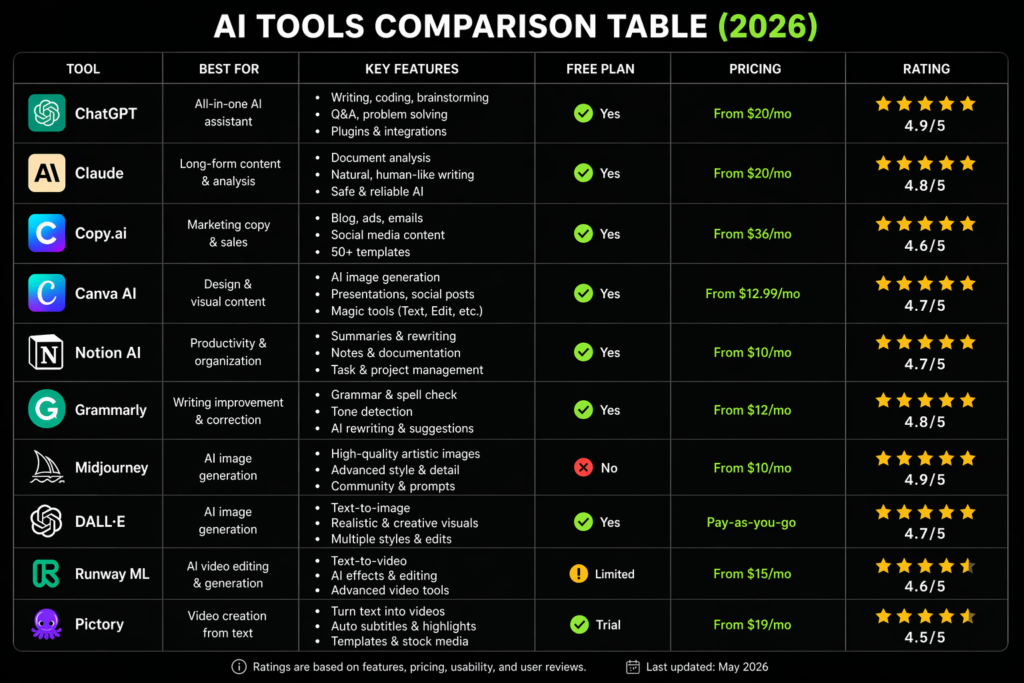
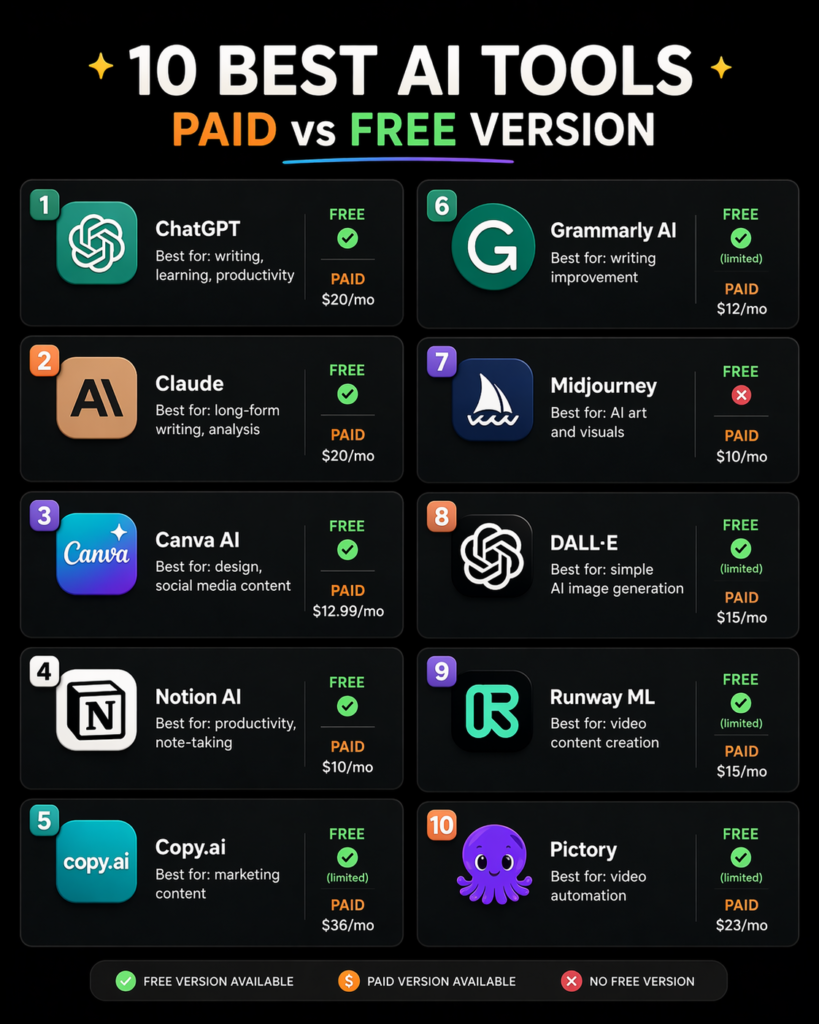
Choosing the right AI tool depends on your goals. If you need a powerful all-in-one assistant, ChatGPT or Claude are excellent choices. For content marketing, Copy.ai is a strong option, while Canva AI and MidJourney are perfect for visual creation. Tools like Notion AI and Grammarly improve productivity and writing quality, while Runway ML and Pictory are ideal for video content creation. Comparing features, pricing, and use cases will help you find the best AI tool for your needs.
What Are AI Tools?
AI tools are software applications that use artificial intelligence to perform tasks that normally require human effort.
These tools can:
- generate text
- create images
- automate workflows
- analyze data
- help with writing, coding, and marketing
The best part? Many AI tools are beginner-friendly and require no technical skills.
Why Beginners Should Use AI Tools
Using AI tools can give you a huge advantage, even if you’re just starting.
Key Benefits
- ⏱️ Save time on repetitive tasks
- 💡 Generate ideas instantly
- 📈 Improve productivity
- 💰 Discover new ways to make money online
- 🎯 Learn faster with AI assistance
10 Best AI Tools for Beginners
1. ChatGPT

ChatGPT is one of the most popular AI tools for beginners. It can help you write articles, answer questions, generate ideas, and even assist with coding.
Best for: writing, learning, productivity
Pros: easy to use, versatile
Cons: advanced features may require a paid plan
2. Claude
Claude is a powerful AI assistant known for generating high-quality and natural text. It’s great for longer content and more detailed responses.
Best for: long-form writing, analysis
Pros: very accurate and natural responses
Cons: fewer integrations compared to others

3. Canva AI
4. Notion AI
Canva AI allows you to create stunning designs, social media posts, and presentations using AI tools.
Best for: design, social media content
Pros: beginner-friendly, visual tools
Cons: some features are paid
Notion AI helps you organize notes, generate content, and manage tasks efficiently.
Best for: productivity, note-taking
Pros: all-in-one workspace
Cons: requires setup
5. Copy.ai
6. Grammarly AI
Copy.ai is designed for marketers and content creators. It can generate blog posts, ads, and product descriptions.
Best for: marketing content
Pros: fast content generation
Cons: limited free plan
Grammarly AI helps improve your writing by correcting grammar, tone, and clarity.
Best for: writing improvement
Pros: easy to use, real-time suggestions
Cons: premium version needed for full features
7. Midjourney
8. DALL·E
Midjourney is an AI tool that creates stunning images from text prompts.
Best for: AI art and visuals
Pros: high-quality images
Cons: requires Discord
DALL·E generates images from text and is beginner-friendly compared to other tools.
Best for: simple AI image generation
Pros: easy to use
Cons: limited free credits

9. Runway ML
10. Pictory
Runway ML is a powerful tool for video editing and AI-generated media.
Best for: video content creation
Pros: advanced features
Cons: learning curve
Pictory helps turn text into videos automatically, perfect for content creators.
Best for: video automation
Pros: saves time
Cons: paid features


Free vs Paid AI Tools
Free tools are great for:
- beginners
- testing features
- small projects
Paid tools are better for:
- advanced features
- business use
- higher limits
👉 Start with free plans, then upgrade if needed.
Many AI tools offer both free and paid versions.
🔵 How to Choose the Right AI Tool
When choosing an AI tool, consider:
- 🎯 Your goal (writing, design, business)
- 💰 Your budget
- 🧠 Your experience level
👉 Beginners should focus on tools that are simple and intuitive.
🔵 Tips for Beginners Using AI
- Don’t fully rely on AI — always review results
- Learn how to write better prompts
- Start with one tool, not ten
- Practice regularly
🔵 Conclusion
AI tools are becoming essential in 2026, and getting started has never been easier. With the right tools, even beginners can create content, automate tasks, and improve productivity.
Start with a few tools from this list, experiment, and gradually build your AI workflow.